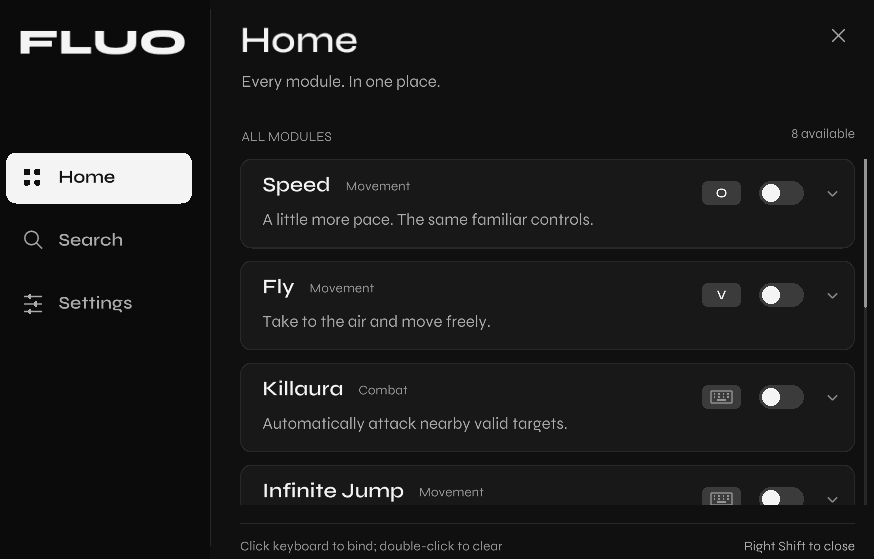
Everything in view.
FLUO provides a single place to view all modules
Every module. One place. FLUO brings a focused control center into your FreeSM-managed Minecraft session.
01 / THE CLIENT
A clear, monochrome space for the modules that matter. Move from overview to action without losing your place.
FLUO provides a single place to view all modules
Press Right Shift in-game to open FLUO when you need it.
FLUO provides blatant & closet cheating
02 / THE FIT
FLUO is designed for your Freesm launcher with Minecraft version 1.8.9
No Forge or Fabric required
No native injector
No separate control program
Official Minecraft Launcher profiles are not supported.
03 / GET STARTED
A short setup for the right instance. Keep FreeSM and Minecraft closed until installation is complete.
Download Freesm Launcher from freesmlauncher.org, create a 1.8.9 Minecraft instance and then download FLUOSetup.exe. Do not open FreeSM during installation
Open FLUOSetup.exe. The default FreeSM data folder is detected automatically; use Browse if yours is elsewhere.
Choose the Minecraft 1.8.9 instance, then click “Install FLUO”.
Reopen FreeSM, launch 1.8.9, and press Right Shift in-game.
04 / READY WHEN YOU ARE
Free to download. Built for FreeSM-managed vanilla Minecraft 1.8.9.
Download FLUOSetup.exe